
Software Testing Introduction
Writing software is a process where developers take a vision of what an application should do in the form of requirements, design a solution, and then write code that implements the requirements. However, the code that is written may not exactly match the requirements of the system, resulting in lost revenue for a company (or for this class, lost points on an assignment).
Software testing is a process for identifying software faults. A software fault, or logic error, is defined as “an incorrect step, process, or data definition in a program”1. By systematically testing software, we can identify faults in our code and correct those faults as early as possible. The goal of testing is to remove as many faults as possible before releasing the application to our customer. The International Organization for Standardization (ISO) defines software testing as “the dynamic verification of the behavior of a program on a finite set of test cases, suitably selected from the usually infinite execution domains, against the expected behavior”2. The keywords here are:
- Dynamic: meaning we execute the code under test;
- Suitably selected: meaning we systematically and deliberately choose test inputs; and
- Expected behavior: meaning we know what we want the program to do, so that we will know when the program does not meet the requirements.
Software faults typically originate from a programmer mistake, which is “a human action that produces an incorrect result”1. A mistake in the requirements, design, or code, is a fault. Faults remains latent in the software until running the software produces a failure. A software failure is “an event in which a system or system component does not perform a required function within specified limits” 1. Failures happen when a program’s behavior deviates from the expected program behavior. Testing identifies failures in a program’s behavior. Investigation of the failure (guided by the failing test case) will lead to one or more underlying fault(s) in the software that must be fixed. This investigation and fixing of faults is called debugging.
Testing consists of many executions of a program and each execution has a different input with a different expected result. A distinct execution with a given input and expected output is a test case.
Test Cases
A test case contains (explicitly or implicitly) the following information:
- A unique identifier;
- A set of test inputs;
- The expected results from executing the test inputs; and
- The actual results of running the test case.
Unique Identifier: A unique identifier names a test case. The name should be descriptive of what the test verifies or what requirement(s) the test validates.
Test Inputs: A test case should have a set of one or more inputs. The inputs drive the test case and may be parameters to a method, user inputs to a user interface (UI), or files that an application uses. The key is that these inputs should be specific and repeatable. Both characteristics are required so that anyone can execute a test case and receive the expected results (assuming that the program has no faults). If specific inputs are not recorded, then more time may be spent trying to rediscover broken functionality, rather than fixing functionality.
Expected Results: The expected results describe the output from a correct execution of the program on a set of given inputs. By knowing what is correct, we can quickly identify when a program is not working. The expected results may be returned from a method or associated methods of a class, be a message or output to a UI, or information written to a file. All expected results should be specific values for clarity in determining if a test passes or fails. The expected results are determined by examining the requirements of the program.
Actual Results: The actual results record what happens when the test case is run. Any difference in expected and actual results represents a failing test case.
Testing Process
Program requirements document what the customer wants a program to do. The requirements define the expected results of a test case. If a test case fails, meaning the actual results of the program do not match the expected results, then we have not met our requirements. A test failure implies a debugging session is necessary to find the underlying fault. The figure below shows the flow for generating and running test cases on a program.
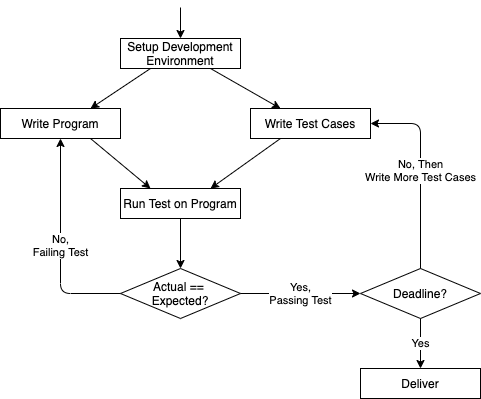
Developers start by writing their program and test cases. These tasks may be done simultaneously or asynchronously depending on personal preference; however, both the source code and the test cases are required before any tests can be run on a program.
A test case is run by executing the program with the test inputs specified by a test case. If the actual output does not match the expected output, the test fails. The failure helps guide developers to the underlying fault to fix the mistake.
Passing tests increase confidence that a program meets the program requirements. If there is more time before a deadline, additional tests will increase confidence further. While software testing is useful for finding underlying faults, no amount of testing can unequivocally demonstrate the absence of faults in your code. Additional testing will provide some confidence that your program will perform as expected most of the time, at least for the cases you tested.
Ultimately, your product must be delivered. Plan your time to allow for sufficient testing of the requirements to ensure delivery of a high quality product.
Testing Strategies
There are two basic testing techniques: System Testing and Unit & Integration Testing. The following sections contain basic testing techniques, including strategies for maximizing the effectiveness of testing. For you, the student, the cost of a failure (and the underlying fault) is a few points off of your programming assignment. For large corporations, the cost of releasing a failure to users can be in the millions, if not billions, of dollars. A mistake can also lead to the loss of customers’ confidence in the company.
Create Project Directory
To help keep our project3 code and other files organized, first create a project directory, which will eventually contain all of your source and test code for your project along with other documents. If your section requires GitHub repos for submissions, your project directory would go within the repo directory.
For example, where our project is named Paycheck:
1
2
3
4
5
6
7
8
9
10
11
% pwd
/afs/unity.ncsu.edu/users/j/jtking/csc116

% mkdir Paycheck

% ls
Paycheck

% cd Paycheck
% pwd
/afs/unity.ncsu.edu/users/j/jtking/csc116/Paycheck
Reminder: GitHub Structure
If your section requires GitHub repos for submissions, your project directory would go within the repo directory. You will clone the repo and move into the repo directory prior to creating project directory. For example, where our project is named Paycheck and your cloned repo is csc116-001-LabX-01:
1
2
3
4
5
6
7
8
9
10
11
% pwd
/afs/unity.ncsu.edu/users/j/jtking/csc116/csc116-001-LabX-01

% mkdir Paycheck

% ls
Paycheck

% cd Paycheck
% pwd
/afs/unity.ncsu.edu/users/j/jtking/csc116/csc116-001-LabX-01/Paycheck
Project Structure
Within the project directory, we will create the following directories, which will help organize and separate your files into:
src(source code),test(test code),lib(library files),bin(compiled.classfiles),doc(generated Javadoc files),test-files(test files - input or output), andproject_docs(project document) files (e.g., System Test Plan)
1
2
3
4
5
6
7
8
9
Paycheck
    -> src  (directory will contain your source code)
    -> test (directory will contain your test code)
    -> lib  (directory will contain your JUnit library file)
    -> bin  (directory that will contain all of your .class files)
    -> doc  (directory that will contain all of your Javadoc files)
    -> test-files (directory that will contain your test files - input & output)
    -> project_docs (directory that will contain all of your project documents,
                     e.g., System Test Plan)
Footnotes
-
Systems and software engineering – Vocabulary. (2010). ISO/IEC/IEEE 24765:2010(E), 1–418. https://doi.org/10.1109/IEEESTD.2010.5733835 ↩ ↩2 ↩3
-
ISO/IEC TR 19759:2005. Software Engineering – Guide to the Software Engineering Body of Knowledge (SWEBOK). ↩
-
Throughout the Testing materials, the term “project” refers to any program assignment, including projects and exercises. ↩