
System Testing (Closed-Box Testing or Black-Box Testing)
System testing ignores the internals of the program and instead focuses on the inputs and the expected results of the program as defined by the requirements. System testing is also called functional testing, closed-box testing, and black-box testing. The tester treats the program as a “closed box”; the program implementation that generates the program output is unknown. The tester identifies the expected program output from the requirements and can compare the actual output with the expected output. The figure below presents a pictorial representation of system test cases.
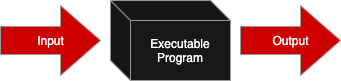
System testing can be used to find the following types of failures:1
- Incorrect or missing functions,
- Interface errors,
- Errors in data structures or external data base access,
- Behavior or performance errors, and
- Initialization and termination errors.
Typically, system tests are run by an unbiased third-party, not the programmer who developed the code. However, in the absence of the third-party tester, a developer can test their own code by ignoring the internals. One good strategy for effective system testing is to write the test cases before starting to write the code. System tests test what the customer wants the program to do and are obtained from the program requirements.
Like all test cases, system test cases have an identifier, a set of specific and repeatable inputs, a set of expected results, and the actual results from executing the test case. The test information can be organized into a System Test Plan document using the table. The System Test Plan should include an overview of the program, tests, and information about how to start testing the program. If the tests require any files, information about where those files are and the file contents should be included.
| Test ID | Description | Expected Results | Actual Results |
|---|---|---|---|
- The Test ID column of the test plan table contains a unique identifier for the test case. The unique identifier provides a common language for talking about test cases with developers and testers. The Test ID could be a number, but a descriptive phrase about the test case is best. The Test ID column can also contain additional information like the test author’s name, the requirement under test, the type of test, etc.
- The Description column contains the steps and inputs the tester enters into the program. The description may also include preconditions for running the test. For example, the program must be started. The information that is recorded in the description should be specific and repeatable, which means that actual values are given. Instead of saying, “enter a dollar amount between 10 and 20” the description should say “enter 15.” For system testing, the description provides all inputs a user must enter into a program.
- The Expected Results column reports what the program should do as defined by the requirements. This means that the expected results are determined prior to running the program. Like the description column, the expected results should be specific. For system tests cases, the expected results report what the program presents to the user through the user interface.
- The Actual Results column is filled in when the test is executed. Ideally, the actual results should match the expected results. When they do not match, the test fails, and work to debug the program commences. All test cases (failing and passing) should be rerun after debugging. Passing tests should be rerun to ensure that any changes to the program under test did not cause a new fault.
We are covering three system testing strategies: testing requirements, testing representative values of equivalence classes, and testing boundary values. Some of the test cases generated by one strategy may also be generated by another strategy.
Simplified Paycheck Requirements
Calculate wages for employee with $19.00 hourly rate and given number of hours worked.
Input
The Paycheck program prompts the user for the number of hours worked. There is no error checking for user input based on data type.
Output
The following information is printed about the employee:
- hours worked for a week
- hourly pay rate
- paycheck amount
If the hours worked is negative, then a negative paycheck amount is printed.
Testing Strategies
Test Requirements
When testing a program, you should ensure that all of the customer requirements are tested at least once.
The following test case would test the requirement that correct hours worked, pay rate, and paycheck amount are printed. The bold text in the description shows the value the tester would enter into the SimplifiedPaycheck program at the given prompts.
| Test ID | Description | Expected Results | Actual Results |
|---|---|---|---|
| 10 hours worked | Preconditions: SimplifiedPaycheck program started Enter hours worked: 10 |
Hours worked: 10 Hourly rate: $19.00 Paycheck: $190.00 |
Test Equivalence Classes
There is only a limited amount of time to test and an infinite number of possible test cases. We want to focus on test cases that will uncover new errors, not test cases that are essentially equivalent to other test cases. We can divide the input or output space into ranges or categories of data. We generate test cases by picking one representative value from each of the possible input ranges/categories or by picking input values that would get to a representative output value. If all of the values in an equivalence class are handled in a similar way, testing one representative value in each equivalence class increases confidence that the program would work with other inputs from the equivalence class. At a minimum, there are two equivalence classes for input: (1) valid or allowed input and (2) invalid or not allowed input.
The following guidelines are helpful for defining equivalence classes1:
- If the input condition is a range, you’ll create one valid and two invalid (above and below the valid range) equivalence classes.
- If input conditions are specific values, then the values are each a valid (for that value) equivalence class and all other values are in an invalid equivalence class.
- If input conditions are members of a set, then the members of the set are in the valid equivalence class and all other possibilities are in the invalid equivalence class.
- If an input condition is a boolean, there is one valid and one invalid equivalence class.
Representative values for an equivalence class are the specific valid/invalid values or a middle value in a range. If valid or invalid input is a range of numbers, choose a value that is in the middle of the range, rather than a value at range boundary. The boundary values are considered next.
| Test ID | Description | Expected Results | Actual Results |
|---|---|---|---|
| Positive equivalence class: 10 hours worked |
Preconditions: SimplifiedPaycheck program started Enter hours worked: 10 |
Hours worked: 10 Hourly rate: $19.00 Paycheck: $190.00 |
|
| Negative equivalence class: -10 hours worked |
Preconditions: SimplifiedPaycheck program started Enter hours worked: -10 |
Hours worked: -10 Hourly rate: $19.00 Paycheck: $-190.00 |
Test Boundary Values
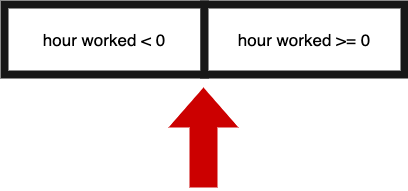
Programmers tend to make mistakes at the boundaries of equivalence classes. Think of the mistakes you may have made when specifying the start and end points of a for loop. Boundary value analysis guides the creation of test cases at the boundaries or edges of a problem. When testing a boundary, you want to test the boundary itself. You also want to test the values immediately on either side of the boundary.
The input for hours worked for the SimplifiedPaycheck program has one boundary as illustrated below. We want to test the boundary of 0 and the values to either side.
| Test ID | Description | Expected Results | Actual Results |
|---|---|---|---|
| Boundary value: 1 hour worked |
Preconditions: SimplifiedPaycheck program started Enter hours worked: 1 |
Hours worked: 1 Hourly rate: $19.00 Paycheck: $19.00 |
|
| Boundary value: 0 hours worked |
Preconditions: SimplifiedPaycheck program started Enter hours worked: 0 |
Hours worked: 0 Hourly rate: $19.00 Paycheck: $0.00 |
|
| Boundary value: -1 hour worked |
Preconditions: SimplifiedPaycheck program started Enter hours worked: -1 |
Hours worked: -1 Hourly rate: $19.00 Paycheck: $-19.00 |