
Unit & Integration Testing (Open-Box Testing or White-Box Testing)
With Unit & Integration Testing, the code under test is known, and we can use what we know about the code and the paths through the code to guide our tests. Additionally, our test cases and knowledge about the code can help guide us to the code locations likely to contain errors. This testing is also called open-box testing and white-box testing. Unit & Integration Testing techniques allow the tester to1:
- exercise independent paths within the source code;
- exercise logical decisions as both true and false; and
- exercise loops at their boundaries.
Later classes in the CSC curriculum at NCSU will provide instruction on testing internal data structures.
Typically, you want to focus on testing individual methods. This type of testing is called unit testing. Unit testing means that we are testing a specific unit of code, in our case, individual methods. When we start testing methods together, for example when one method calls another method, we are running integration tests. Integration testing means that we are testing how units of code work together. A combination of unit and integration testing can increase the confidence that small portions of our code work together. If the small portions work together, then it is more likely the full system will work correctly.
The test strategies discussed for system testing (e.g., test requirements, test equivalence classes, and test boundaries) still apply for unit and integration testing. The focus of the test is shifted from the entire program to a method or small unit of our code. With unit and integration testing, we can consider another testing strategy: basis set testing. Since we know the code under test, we can write test cases to exercise all paths in the code. We will write tests using each of these strategies.
First, we will discuss how to structure our tests so that we may automate their execution. JUnit is a software testing framework for the Java programming language that reduces the complexity of implementing unit and integration test cases for your code.
Paycheck Requirements
Raleigh’s Parks and Recreation Department hires landscapers to care for and maintain the city’s parks.
Skill Level
An employee has one of three skill levels; each with a hourly pay rate:
| Skill Level | Hourly Pay Rate ($) |
|---|---|
| Level 1 | $19.00 |
| Level 2 | $22.50 |
| Level 3 | $25.75 |
Deductions
All employees may opt in for insurance, which results in a deduction from their pay check.
| Deduction | Weekly Cost ($) |
|---|---|
| Option 1 - Medical Insurance | $24.50 |
| Option 2 - Dental Insurance | $15.30 |
| Option 3 - Vision Insurance | $5.25 |
Employees at skill level 3 may also opt to place up to 6% of their gross pay into a retirement account.
Input
The Paycheck program prompts the user for information about the Employee, including the name, level (1, 2, or 3), hours worked, retirement percent, and whether he or she has medical, dental, and vision insurances. This program assumes a perfect user. There is no error checking for user input based on data type.
Output
The following information is printed about the employee’s pay check:
- employee’s name
- hours worked for a week
- hourly pay rate
- regular pay for up to 40 hours worked
- overtime pay (1.5 pay rate) for hours over 40 worked
- gross pay (regular + overtime)
- total deductions
- net pay (gross pay – total deductions).
If the net pay is negative, meaning the deductions exceeds the gross pay, then an error is printed.
JUnit 5
For these testing materials, we will use JUnit 5.2
JUnit is not provided in the default Java libraries (String, Scanner, etc. are provided with Java). Instead, we have to download the JUnit libraries.
Download JUnit Libraries
- Download
junit-platform-console-standalone-1.6.2.jarfile into yourlibdirectory in your project.
junit-platform-console-standalone-1.6.2.jar is required to run test cases from the command line.
The directory structure should now be:
1
2
3
4
5
6
7
8
9
10
11
12
Paycheck
    -> src
        -> Paycheck.java
    -> test
    -> lib
        -> junit-platform-console-standalone-1.6.2.jar
    -> bin
        -> Paycheck.class
    -> doc
    -> test-files
    -> project_docs
        -> System Test Plan
Writing Unit Test Cases
For unit test cases, we can automate our test cases by creating a test class. By convention, JUnit test classes should be named <nameOfSourceClass>Test.java. Therefore, the test class for a program called Paycheck would be PaycheckTest. All test classes will go in the test directory.
If our program under test contains methods, we can call methods in the program under test similarly to how we call methods of the Math class:
1
<ProgramUnderTest>.<methodName>(<parameters>);
When creating a test program, the test cases can be broken out into methods. You can have one or more test methods for each method under test. A good naming convention is to call your test method test<MethodName><DescriptionOfTest>.
Inside of each test method, we need to use one or more JUnit assert statements.
JUnit Annotations
The test class includes different types of methods that have the following annotations:
@BeforeEachis used to identify a method that executes before each of your individual test methods. This is useful for constructing new objects and ensures that each test executes with the same initial starting conditions.@Testis used to identify each test method in your test class.
PaycheckTest Skeleton
1
2
3
4
5
6
7
8
9
10
11
12
13
14
15
16
17
18
19
20
21
22
23
24
25
26
27
28
29
30
31
32
33
34
35
36
37
38
39
40
41
42
43
44
45
46
47
48
49
50
51
52
53
54
55
56
57
58
59
60
61
import static org.junit.jupiter.api.Assertions.*;

import org.junit.jupiter.api.Test;

/**
 * Test class for the Paycheck program.
 *
 * @author Sarah Heckman
 * @author Jessica Young Schmidt
 */
public class PaycheckTest {

    /**
     * Test the Paycheck.getPayRate() method.
     */
    @Test
    public void testGetPayRate() {

    }

    /**
     * Test the Paycheck.calculateRegularPay() method.
     */
    @Test
    public void testCalculateRegularPay() {

    }

    /**
     * Test the Paycheck.calculateOvertimePay() method.
     */
    @Test
    public void testCalculateOvertimePay() {

    }

    /**
     * Test the Paycheck.calculateGrossPay() method.
     */
    @Test
    public void testCalculateGrossPay() {

    }

    /**
     * Test the Paycheck.calculateTotalDeductions() method.
     */
    @Test
    public void testCalculateRetirement() {

    }

    /**
     * Test the Paycheck.calculateNetPay() method.
     */
    @Test
    public void testCalculateNetPay() {

    }

}
The directory structure should now be:
1
2
3
4
5
6
7
8
9
10
11
12
13
14
Paycheck
    -> src
        -> Paycheck.java
    -> test
        -> PaycheckTest.java
    -> lib
        -> junit-platform-console-standalone-1.6.2.jar
    -> bin
        -> Paycheck.class
        -> PaycheckTest.class
    -> doc
    -> test-files
    -> project_docs
        -> System Test Plan
Assert Statements
The JUnit library includes many different types of assert methods. The common ones you may use are outlined in the table below.3
| Method | Description |
|---|---|
assertTrue(boolean condition) |
asserts that the condition passed as a parameter is boolean true. If it is not true, the test case will fail. |
assertTrue(boolean condition, String message) |
asserts that the condition passed as a parameter is boolean true. If it is not true, the test case will fail with the given message. |
assertFalse(boolean condition) |
asserts that the condition passed as a parameter is boolean false. If it is not false, the test case will fail. |
assertFalse(boolean condition, String message) |
asserts that the condition passed as a parameter is boolean false. If it is not false, the test case will fail with the given message. |
assertEquals(int expected, int actual)assertEquals(char expected, char actual) assertEquals(Object expected, Object actual) |
asserts that expected equals the actual. If the two values are not equal, the test case will fail. |
assertEquals(int expected, int actual, String message)assertEquals(char expected, char actual, String message) assertEquals(Object expected, Object actual, String message) |
asserts that expected equals the actual. If the two values are not equal, the test case will fail with the given. |
assertEquals(double expected, double actual, double delta) |
asserts that expected and actual are equal to within a non-negative delta. Otherwise, the test case will fail. |
assertEquals(double expected, double actual,double delta, String message) |
asserts that expected and actual are equal to within a non-negative delta. Otherwise, the test case will fail. |
Compile the Project Code
To compile our project, we have to do a series of steps. We have to compile the source code, compile the test code, and also tell Java where to find the JUnit library file that we downloaded into our lib directory.
First, change directory into the top-level of your project (the Paycheck directory).
Compile Source Code
Assuming you are currently in your top-level project directory (Paycheck), then compile your source code using the following command:
1
javac -d bin -cp bin src/Paycheck.java
The -d argument tells Java the destination directory that it should save the compiled .class files into. Here, we tell Java to save the .class files into the bin directory. The -cp argument tells Java that the next token is the directory that follows contains our compiled .class files and library files.
Compile Test Code
Assuming you are currently in your top-level project directory (Paycheck), then compile your test code using the following command on Linux/Mac:
1
javac -d bin -cp "bin:lib/*" test/PaycheckTest.java
Compile your test code using the following command on Windows:
1
javac -d bin -cp "bin;lib/*" test/PaycheckTest.java
- The
-cpargument tells Java that the next token is the directory that follows contains our compiled.classfiles and library files. binindicates that thebindirectory contains our compiled.classfiles. We save our.classfiles into thebindirectory to keep them separated from our.javafiles.- In addition, we specify the path to our libary files (in the
lib/directory). Here, we can use the wildcard symbol (*) so that we do not have to type out the full name of the.jarfile. - LINUX/MAC: Notice that the different classpaths are separated by a
:(colon) instead of a semicolon. - WINDOWS: Notice that the different classpaths are separated by a
;(semicolon) instead of a colon.
Execute the Test Cases
Now that we have compiled all the source and test code, we can execute our test cases.
Your directory structure should be:
1
2
3
4
5
6
7
8
9
10
11
12
13
14
Paycheck
    -> src
        -> Paycheck.java
    -> test
        -> PaycheckTest.java
    -> lib
        -> junit-platform-console-standalone-1.6.2.jar
    -> bin
        -> Paycheck.class
        -> PaycheckTest.class
    -> doc
    -> test-files
    -> project_docs
        -> System Test Plan
When we execute Java programs, we are actually executing the .class files.
To execute the PaycheckTest test cases, make sure you are in your top-level project directory (Paycheck) and use the following command:
1
java -jar lib/junit-platform-console-standalone-1.6.2.jar -cp bin -c PaycheckTest
Interpreting the Results
You should receive terminal output similar to the following if your tests are failing:
1
2
3
4
5
6
7
8
9
10
11
12
13
14
15
16
17
18
19
20
21
22
23
24
25
26
27
28
29
30
31
32
33
34
35
36
37
38
39
40
41
42
43
44
$ java -jar lib/* -cp bin -c PaycheckTest

Thanks for using JUnit! Support its development at https://junit.org/sponsoring

╷
├─ JUnit Jupiter ✔
│  └─ PaycheckTest ✔
│     ├─ testCalculateNetPay() ✔
│     ├─ testGetPayRate() ✔
│     ├─ testCalculateOvertimePay() ✘ Paycheck.calculateOvertimePay(Paycheck.LEVEL_1_PAY_RATE, 36) ==> expected: <0> but was: <1>
│     ├─ testCalculateRetirement() ✔
│     ├─ testCalculateRegularPay() ✔
│     └─ testCalculateGrossPay() ✔
└─ JUnit Vintage ✔

Failures (1):
  JUnit Jupiter:PaycheckTest:testCalculateOvertimePay()
    MethodSource [className = 'PaycheckTest', methodName = 'testCalculateOvertimePay', methodParameterTypes = '']
    => org.opentest4j.AssertionFailedError: Paycheck.calculateOvertimePay(Paycheck.LEVEL_1_PAY_RATE, 36) ==> expected: <0> but was: <1>
       org.junit.jupiter.api.AssertionUtils.fail(AssertionUtils.java:55)
       org.junit.jupiter.api.AssertionUtils.failNotEqual(AssertionUtils.java:62)
       org.junit.jupiter.api.AssertEquals.assertEquals(AssertEquals.java:150)
       org.junit.jupiter.api.Assertions.assertEquals(Assertions.java:542)
       PaycheckTest.testCalculateOvertimePay(PaycheckTest.java:159)
       java.base/jdk.internal.reflect.NativeMethodAccessorImpl.invoke0(Native Method)
       java.base/jdk.internal.reflect.NativeMethodAccessorImpl.invoke(NativeMethodAccessorImpl.java:62)
       java.base/jdk.internal.reflect.DelegatingMethodAccessorImpl.invoke(DelegatingMethodAccessorImpl.java:43)
       java.base/java.lang.reflect.Method.invoke(Method.java:566)
       org.junit.platform.commons.util.ReflectionUtils.invokeMethod(ReflectionUtils.java:686)
       [...]

Test run finished after 108 ms
[         3 containers found      ]
[         0 containers skipped    ]
[         3 containers started    ]
[         0 containers aborted    ]
[         3 containers successful ]
[         0 containers failed     ]
[         6 tests found           ]
[         0 tests skipped         ]
[         6 tests started         ]
[         0 tests aborted         ]
[         5 tests successful      ]
[         1 tests failed          ]
The output lists each of the test cases that ran, along with a summary of the test results. The long stacktrace indicates the sequence of method calls that let to the test case failure.
If NO tests failed, then your output would look similar to the following:
1
2
3
4
5
6
7
8
9
10
11
12
13
14
15
16
17
18
19
20
21
22
23
24
25
26
27
28
29
$ java -jar lib/* -cp bin -c PaycheckTest


Thanks for using JUnit! Support its development at https://junit.org/sponsoring

╷
├─ JUnit Jupiter ✔
│  └─ PaycheckTest ✔
│     ├─ testCalculateNetPay() ✔
│     ├─ testGetPayRate() ✔
│     ├─ testCalculateOvertimePay() ✔
│     ├─ testCalculateRetirement() ✔
│     ├─ testCalculateRegularPay() ✔
│     └─ testCalculateGrossPay() ✔
└─ JUnit Vintage ✔

Test run finished after 127 ms
[         3 containers found      ]
[         0 containers skipped    ]
[         3 containers started    ]
[         0 containers aborted    ]
[         3 containers successful ]
[         0 containers failed     ]
[         6 tests found           ]
[         0 tests skipped         ]
[         6 tests started         ]
[         0 tests aborted         ]
[         6 tests successful      ]
[         0 tests failed          ]
Testing Strategies
Test Requirements
We start by testing the requirements of the method, which means we are testing the main functionality of the method. For Paycheck.calculateRegularPay(), the main functionality is that the method will return the employee’s regular pay for the given pay rate and hours worked. The code for Paycheck.calculateRegularPay() is below.
1
2
3
4
5
6
7
8
9
10
11
12
13
14
    /**
     * Returns the employee's regular pay for the hours worked up to the first
     * REGULAR_PAY_MAX_HOURS hours worked.
     *
     * @param payRate employee's pay rate
     * @param hoursWorked number of hours worked by the employee
     * @return employee's regular pay
     */
    public static int calculateRegularPay(int payRate, double hoursWorked) {
        if (hoursWorked > REGULAR_PAY_MAX_HOURS) {
            return payRate * REGULAR_PAY_MAX_HOURS;
        }
        return (int) (payRate * hoursWorked);
    }
Implementation of the calculateRegularPay method in the Paycheck program.
A simple test is shown below. The description is a String version of the method call that generates the actual result for the test. Since the Paycheck.calculateRegularPay() method returns a int, the result is concatenated to the empty String to generate a String output for the actual results.
1
2
3
4
5
6
7
8
9
10
11
    /**
     * Test the Paycheck.calculateRegularPay() method.
     */
    @Test
    public void testCalculateRegularPay() {
        // Less than 40 hours
        // Regular Level 1 36 hours
        assertEquals(68400,
                Paycheck.calculateRegularPay(Paycheck.LEVEL_1_PAY_RATE, 36),
                "Paycheck.calculateRegularPay(Paycheck.LEVEL_1_PAY_RATE, 36)");
    }
Requirement test for Paycheck.calculateRegularPay() in PaycheckTest.
Test Equivalence Classes
The strategy of testing representative values from equivalence classes still applies to unit and integration testing. We break up the possible inputs for each parameter into equivalence classes and test representative values for each parameter. There are two parameters for Paycheck.calculateRegularPay(): the pay rate and the hours worked. For the hours worked, the equivalence classes are hours less than 0, hours between 0 and 40, and hours greater than 40. Since we are focusing on representative values, we can choose values that are away from 40. Good representative values would be 36 and 46, shown below.
1
2
3
4
5
6
7
8
9
10
11
12
13
14
15
16
17
    /**
     * Test the Paycheck.calculateRegularPay() method.
     */
    @Test
    public void testCalculateRegularPay() {
        // Less than 40 hours
        // Regular Level 1 36 hours
        assertEquals(68400,
                Paycheck.calculateRegularPay(Paycheck.LEVEL_1_PAY_RATE, 36),
                "Paycheck.calculateRegularPay(Paycheck.LEVEL_1_PAY_RATE, 36)");

        // Over 40 hours
        // Regular Level 1 46 hours
        assertEquals(76000,
                Paycheck.calculateRegularPay(Paycheck.LEVEL_1_PAY_RATE, 46),
                "Paycheck.calculateRegularPay(Paycheck.LEVEL_1_PAY_RATE, 46)");
    }
Equivalence class tests for Paycheck.calculateRegularPay() in PaycheckTest.
Test Boundary Values
Once representative values of a method are tested, boundary values between the equivalence classes (if there are boundary values) should be tested. For Paycheck.calculateRegularPay(), there are two boundaries: 1) at 0 hours and 2) at 40 hours. We will focus on the boundary at 40. There are three tests to consider: 39 hours, 40 hours, and 41 hours. These correspond to the standard boundary value tests at the boundary, one less than the boundary, and one more than the boundary. The boundary value tests are shown below. Similar tests should be done for the lower boundaries.
1
2
3
4
5
6
7
8
9
10
11
12
13
14
15
16
17
18
19
20
21
22
23
    /**
     * Test the Paycheck.calculateRegularPay() method.
     */
    @Test
    public void testCalculateRegularPay() {
        // Testing boundary
        // Less than 40 hours
        // Regular Level 1 39 hours
        assertEquals(74100,
                Paycheck.calculateRegularPay(Paycheck.LEVEL_1_PAY_RATE, 39),
                "Paycheck.calculateRegularPay(Paycheck.LEVEL_1_PAY_RATE, 39)");

        // Regular Level 1 40 hours
        assertEquals(76000,
                Paycheck.calculateRegularPay(Paycheck.LEVEL_1_PAY_RATE, 40),
                "Paycheck.calculateRegularPay(Paycheck.LEVEL_1_PAY_RATE, 40)");

        // Over 40 hours
        // Regular Level 1 41 hours
        assertEquals(76000,
                Paycheck.calculateRegularPay(Paycheck.LEVEL_1_PAY_RATE, 41),
                "Paycheck.calculateRegularPay(Paycheck.LEVEL_1_PAY_RATE, 41)");
    }
Boundary value tests for Paycheck.calculateRegularPay() in PaycheckTest.
Test All Paths
Since the code under test is known, the code may be used to guide writing unit or integration tests for a method. One testing strategy is to ensure that every path in the method has been executed at least once. We can determine all of the valid paths, called the basis set, through a method and write a test for each one. Using equivalence classes to drive unit and integration testing should identify most of the possible paths through a method. Supplementing equivalence class testing with information about the possible paths ensures that all statements in the method are executed at least once and increases confidence that the method works correctly.
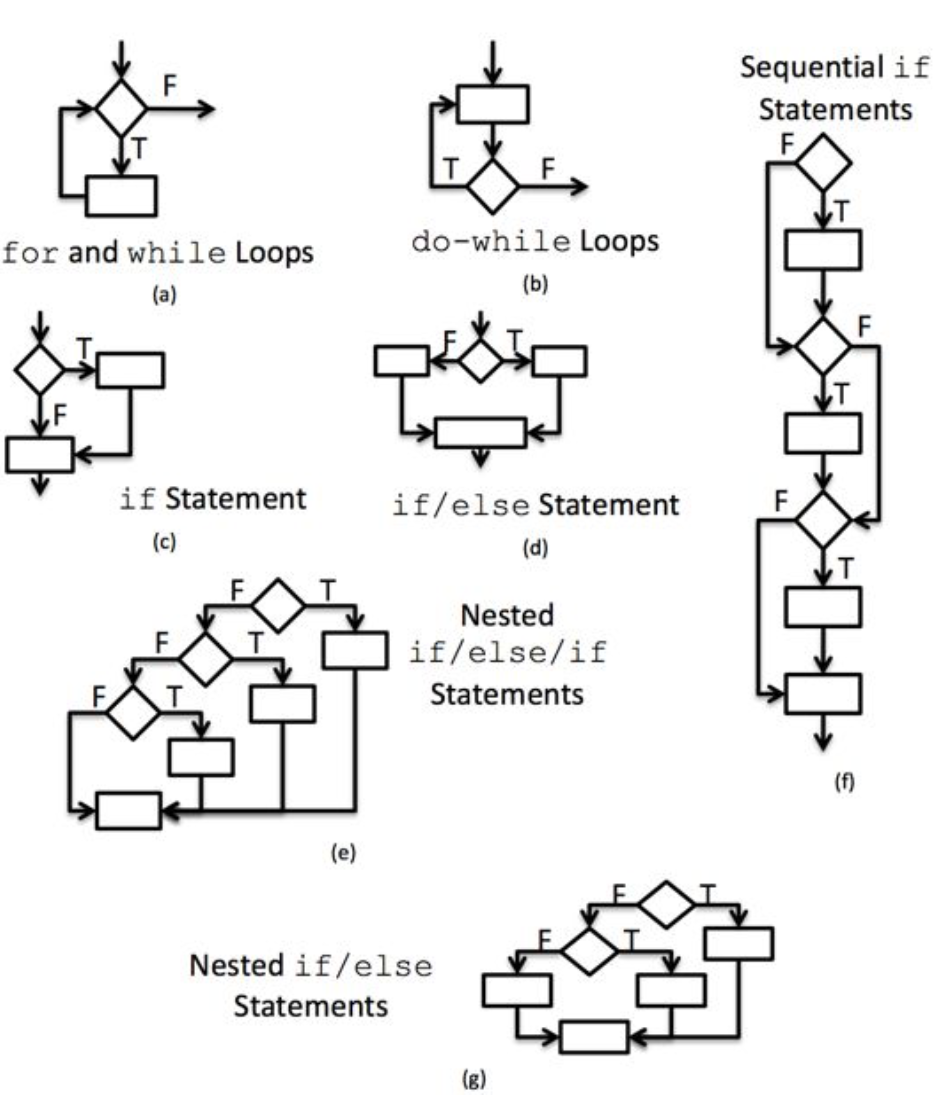
When performing unit and integration testing we are interested in the control flow of the program. The control flow is a graph that contains decision points and executed statements. Each decision (conditional test in an if statement) in the method is shown as a diamond. The statements are in rectangles.
There are standard templates for each of the control structures that make decisions in our code. These templates are provided in figure below.
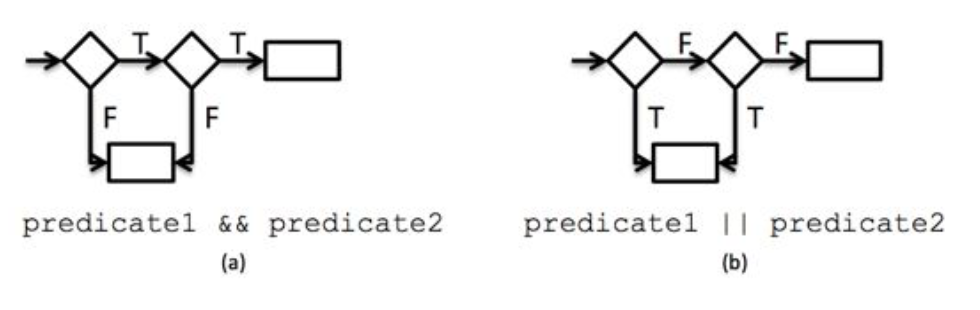
If the if statement contains compound conditional tests (i.e., the conditional tests are separated by && or ||), then each conditional test within the compound statement is shown as a separate diamond. The figure below shows standard templates for conditional statements with compound predicates. Diagram (a) of figure below shows two predicates that are and-ed together. Both statements have to be true for the statement on the right to execute. If either predicate is false, then the inner portion of the conditional test will never execute. Diagram (b) of figure below shows two predicates that are or-ed together. Either statement can be true for the body of the conditional (represented by the lower statement) to execute. If both statements are false, then the body of the conditional test never executes.
A measure called cyclomatic complexity provides a guide for the number of possible paths through the code. When creating unit tests, we want to create a test case for each possible path through the code. There are several calculations for cyclomatic complexity, but the easiest is to add one to the number of decision nodes (diamonds) in the control flow graph. Cyclomatic complexity provides us with the upper bound of the number of tests that we should write to guarantee full execution of the method if the tests are chosen appropriately such that they cover the paths. That is the minimum set of test cases that we should write just for execution of all conditionals on their true and false paths. However, one or more of the paths may be invalid. If a program requires that the same conditional predicate is used in two sequential if statements, that predicate will always evaluate the same as long as there is no change to the value. The path where one predicate would first evaluate true and the second predicate would evaluate to false can never occur. That’s why cyclomatic complexity is an estimate of the number of tests that you need for a method.
Once we have possible paths, we can create input values that will test each of the paths. Creating tests to consider all paths of statements is straightforward. Creating tests to consider all paths of loops is more complex (See Testing: Loops).
We will now use the test all paths strategy to test Paycheck.calculateRegularPay(). The control flow diagram for Paycheck.calculateRegularPay() is shown in figure below.
1
2
3
4
5
6
    public static int calculateRegularPay(int payRate, double hoursWorked) {
        if (hoursWorked > REGULAR_PAY_MAX_HOURS) {
            return payRate * REGULAR_PAY_MAX_HOURS;
        }
        return (int) (payRate * hoursWorked);
    }
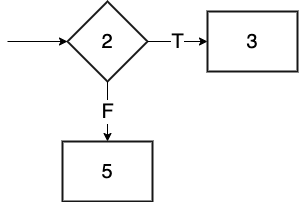
The cyclomatic complexity of Paycheck.calculateRegularPay() is 1 diamond + 1 = 2. This implies that there are as many as 2 valid paths through the method. The possible paths are:
- 2-3
- 2-5
The tests shown above cover the two valid paths for the Paycheck.calculateRegularPay() method. Identifying the basis set of tests for a method can help identify requirements and equivalence class tests for a method. However, be careful about only considering valid paths in your code! If your code is missing functionality, you will not write tests for that. You should always think about requirements and equivalence classes when writing unit tests.
Testing Exceptions
Some paths through code will contain conditions that result in the throwing of an exception. Tests should be written to test that the exceptions are thrown.
For Paycheck.calculateRegularPay(), assume we changed the code to the following to test for negative hours worked:
1
2
3
4
5
6
7
8
9
    public static int calculateRegularPay(int payRate, double hoursWorked) {
        if(hoursWorked < 0) {
            throw new IllegalArgumentException("Negative hours worked");
        }
        if (hoursWorked > REGULAR_PAY_MAX_HOURS) {
            return payRate * REGULAR_PAY_MAX_HOURS;
        }
        return (int) (payRate * hoursWorked);
    }
We would use the following test to check for expected exception and exception message:
1
2
3
4
5
6
7
8
9
10
11
12
13
    /**
     * Test the Paycheck.calculateRegularPay() method.
     */
    @Test
    public void testCalculateRegularPay() {
        // Test negative hours
        Exception exception = assertThrows(
                IllegalArgumentException.class, () ->
                        Paycheck.calculateRegularPay(Paycheck.LEVEL_3_PAY_RATE, -1),
                "Testing negative hours worked");
        assertEquals("Negative hours worked", exception.getMessage(),
                "Testing negative hours worked - exception message");
    }